Graphical MD5Sum
MD5 GUI is a small Win 95/98/NT program that generates and checks MD5 checksums.

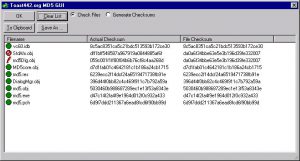
You can download it from here (248k) It is 100% compatible with the md5sum.exe dos program and it’s UNIX equivalent.
There are several functions that are not implemented. Namely, ASCII mode compares. Currently, all checksums are generated in binary mode.
The little green circles mean that a file checked out ok. A little red flag means that a file did not match its checksum. A little “NOT” sign means that the file could not be opened.
When generating checksum files, all the icons will be green. Recursion is not yet supported. If files are added from multiple directories, when the checksum file is saved, only the files
themselves will be listed; the directories from which they came will not.
To use this thing, choose the action you wish (generate or check) and drag the checksum file (in the case of checking files) or multiple files (for generating checksums). The files that were checked, or for which checksums were generated, will be shown in the list box. To create a file with the contents of the list box in standard md5sum format, either click the Save As.. button or the To Clipboard button. Save As.. of course saves a file directly. To Clipboard copies the same format to the clipboard as text.
All downloads and source code are provided AS-IS, and WITHOUT WARRANTY. These files are licensed under the GPL. Please see http://www.gnu.org/licenses/gpl.html for license details.